
Spotify, on your desktop.
Wearing the album art.
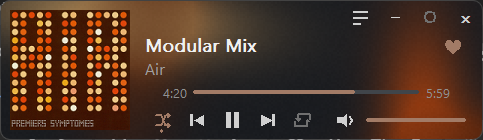
A tiny native Windows widget that shows what Spotify is playing and controls it. A flowing background takes its colors from the cover, and it uses almost no memory or CPU.
What it does
It does not play audio. Spotify keeps playing; the widget is a remote and a display.
Now playing
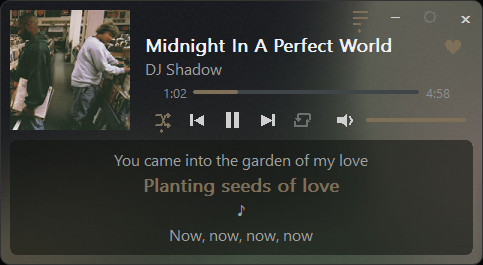
Title, artist and album art, updated the moment the track changes. Click or drag the progress bar to seek.
Full controls
Play/pause, previous, next, shuffle, repeat, mute and a volume slider for Spotify's level.
Synced lyrics
Lyrics that follow the song, in a translucent box, from LRCLIB. Plain lyrics scroll with the wheel.
Liked Songs heart
Save or remove the playing track with one click. It works like the heart in Spotify.
Copy the link
A chain button puts the song's Spotify link on your clipboard.
Flowing gradient
A slow, irregular gradient colored from the album art. It only animates while a track plays.
Yours to arrange
Drag it anywhere, drag an edge to change the width, pin it on top, or hide it to the tray.
Opens with Spotify
Turn on Start with Windows and it waits in the tray, then appears when Spotify opens.
Light on your PC
Measured on the release build while Spotify was playing.
Install
- Download the zip from the latest release and unzip it anywhere.
- Run
oldways.exe. - Right-click the tray icon and tick Start with Windows if you want it at login.
Set up the like button
Everything else works with no login. Only the heart needs your own free Spotify developer app, so nothing is shared with anyone.
- Create an app in the Spotify developer dashboard. The app owner needs Premium.
- Add the redirect URI
http://127.0.0.1:8888/callback. - Copy the app's Client ID.
- Click the heart in the widget. It opens
spotify.txt; paste the Client ID on its own line and save. - Click the heart again and approve in your browser, once.
Private by default
No analytics and no telemetry. The widget reads Spotify through the Windows media session, with no login and no network. It contacts LRCLIB only while the lyrics box is open, and the Spotify Web API only after you connect, and only for the heart.
Build it yourself
You need Rust and the Microsoft C++ build tools.
git clone https://github.com/notkazhons/OldWays
cd OldWays
cargo build --release